Quick answer
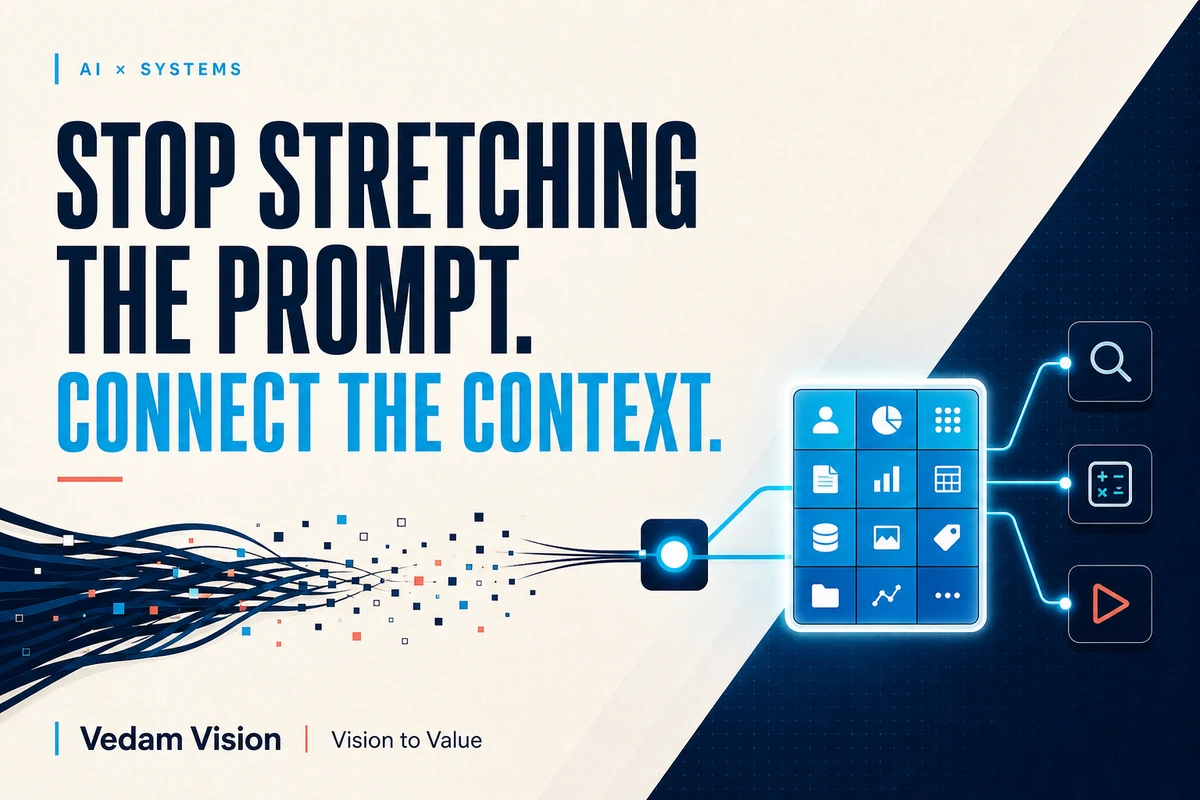
AI context and custom tools usually improve business results more than adding instructions to an already long prompt. Context gives the model the facts, policies, examples, and current state needed for the task. Custom tools let it retrieve trusted data, calculate, validate, or perform a bounded action. A prompt should still define the outcome and rules, but it should not be forced to carry the entire business system.
When an AI output fails, the first reaction is often to make the prompt longer.
Add another rule. Add three examples. Repeat the warning. Explain the company again. Paste a larger document.
Sometimes that helps. Often it creates a prompt that is difficult to maintain and still lacks the one fact the model needs.
Business work depends on changing context: the current customer record, approved product data, today’s stock, the latest policy, the correct price, the right account permissions, and the status of the workflow. A static prompt is a poor database.
The better architecture separates three jobs:
- The prompt defines the task, boundaries, and output.
- Context supplies the relevant business information.
- Tools retrieve, calculate, validate, or act inside controlled limits.
What a prompt should contain
A good prompt is still important.
It should state:
- business outcome
- user or audience
- task instructions
- important constraints
- allowed sources
- output format
- uncertainty behaviour
- review or escalation rule
Google Cloud's official prompting strategies guide describes prompt design as an iterative, test-driven process and lists context, examples, constraints, and output format among useful components.
The prompt should be complete enough to direct the work. It should not contain every product, policy, and customer record the company owns.
Context is the working material
Context is the information the model needs for this specific request.
For a sales follow-up, that may include:
- latest conversation
- approved offer
- lead stage
- promised next step
- relevant product facts
- communication history
For an invoice assistant, context may include the invoice, purchase order, vendor master, tax rules, approval policy, and exception history.
Better context is not simply more text. It is the smallest trusted set that supports the decision.
Too little context invites guessing. Too much context can hide the relevant fact, raise cost, slow the response, and expose information the task does not need.
Use retrieval rules. Filter by customer, date, product, region, document type, access level, and current status. Prefer approved source documents over a large mixed folder.
Tools give AI controlled capabilities
A model can generate language. Business workflows often need more.
A custom tool may:
- look up a customer record
- check inventory
- calculate tax
- retrieve an approved price
- validate an address
- search a policy library
- create a draft ticket
- schedule an available slot
- update a CRM after approval
OpenAI's official explanation of function calling describes it as a way to connect models to external tools and systems for retrieving data, taking actions, performing computation, and building workflows. Structured arguments can make the connection easier to validate.
The key word is connect. The model should not invent the result of a stock check. It should call the approved stock service and use the response.
A practical comparison
| Problem | Longer prompt response | Context or tool response |
|---|---|---|
| Product price changes | Paste price list into prompt | Retrieve approved price by product and region |
| Customer history matters | Add broad persona instructions | Fetch the authorised customer timeline |
| Calculation must be exact | Explain formula repeatedly | Use a deterministic calculator or business rule |
| Policy changes | Paste a large handbook | Retrieve the current approved section |
| Action requires permission | Tell model to be careful | Tool enforces role, limit, approval, and logging |
Long prompts can describe the rule. Tools and context make the rule operational.
Example: a quotation assistant
Imagine a distributor wants AI to prepare quotation drafts.
The long-prompt approach includes product descriptions, discount policy, tax guidance, shipping rules, writing style, customer segments, and approval notes in one giant instruction.
It will become outdated quickly.
A context-and-tool approach works differently.
Prompt
Draft a quotation summary for the customer. Use only tool results. Do not invent price, stock, tax, delivery, warranty, or discount. Flag missing fields. Return a customer-facing summary and an internal approval checklist.
Context
The current enquiry, customer type, requested products, delivery postcode, and relevant conversation.
Tools
Product catalogue lookup, stock check, approved pricing service, tax calculator, delivery estimator, and CRM draft creation.
Human gate
A sales manager approves any discount, unusual warranty, or delivery exception before the quotation is sent.
The prompt is shorter because the system is stronger.
When examples are better than tools
Not every task needs integration.
Examples are valuable when the model needs to learn a pattern of tone, classification, format, or judgment. A support team may provide examples of urgent, standard, and irrelevant tickets. A brand team may provide approved samples showing voice.
Use tools when the task needs current data, exact calculation, controlled action, external state, or enforceable permission.
Use context when the task needs relevant facts and source material.
Use examples when the task needs a pattern.
Use the prompt to connect them.
Why custom tools need strict boundaries
Tool access creates risk as well as value.
Define:
- tool purpose
- allowed input fields
- authorised users
- records it can access
- actions it can take
- transaction limits
- approval requirements
- timeout and retry behaviour
- logs
- error handling
- rollback or correction
Give the system the least authority required. A quotation assistant may create a draft but not email it. A scheduling tool may offer slots but not cancel existing appointments. A CRM tool may add a note but not delete an account.
Validate tool arguments in code. Do not rely only on a sentence telling the model to be careful.
Keep source quality visible
Retrieval can deliver the wrong document if the library is poorly managed.
Every source should have an owner, effective date, status, access rule, and review cycle. Archive duplicates. Mark drafts clearly. Prefer a small approved knowledge base over a large uncontrolled one.
Show the user which source supported the output when the decision matters. If sources conflict, the system should pause or present the conflict rather than silently choose.
Vedam Vision's article AI Is Not the Strategy. Better Decisions Are. explains why evidence and ownership belong before tool excitement. Context quality is part of decision quality.
Test the system, not only the prompt
A prompt test may show that the wording works on one input. A workflow test checks more:
- Was the correct context retrieved?
- Were permissions respected?
- Did the tool return current data?
- Were arguments valid?
- Did the model represent the result accurately?
- Did the human gate appear at the right time?
- Was the action logged?
- Could the team recover from a failure?
Create cases for missing records, stale documents, tool timeouts, conflicting data, restricted access, unusual customer requests, and duplicate actions.
Record the prompt version, tool version, data source, model, test date, and reviewer. A workflow can change even when the prompt does not.
A four-step upgrade from prompt to system
Identify repeated pasted information
If employees paste the same policy, price table, or customer fields every day, that information may belong in approved retrieval or a system connection.
Separate facts from instructions
Keep stable behaviour in the prompt. Move changing facts into context. Move calculations and actions into tools.
Add one bounded tool
Start with a read-only lookup, calculator, or draft action. Confirm permissions, logs, and human approval before adding more authority.
Measure the whole task
Compare accuracy, cycle time, review effort, failure rate, and cost against the existing process. Do not measure only generation speed.
Vedam Vision's AI solutions and automation services cover connected workflows using business data and tools. The useful starting point is one bounded task with a named owner.
Common architecture mistakes
The first is putting confidential data into a shared prompt template. Keep sensitive information in authorised systems and retrieve only what the task needs.
The second is letting the model choose among too many poorly described tools. Use clear names, precise descriptions, narrow inputs, and only the tools relevant to the task.
The third is allowing a tool to both decide and execute a high-impact action without approval.
The fourth is hiding failures. A tool timeout should not be rewritten as a confident answer.
The fifth is forgetting cost. Retrieval, long context, multiple tool calls, retries, and review all affect operating economics.
Build the system around the decision
Longer prompts can improve unclear instructions. They cannot replace trusted data, deterministic calculation, permission control, or system access.
Use the prompt for direction. Use context for relevant truth. Use tools for bounded capability. Use people for accountability.
That combination produces AI context and custom tools that are easier to maintain, safer to operate, and more useful than another page of prompt instructions.
Frequently asked questions
What is context in an AI workflow?
Context is the relevant information supplied for a specific task, such as current records, policies, conversation history, product data, or approved examples.
What is a custom AI tool?
A custom tool is a defined function or system connection the model can request for retrieval, calculation, validation, or a controlled action.
Are longer prompts bad?
No. Detailed prompts are useful when the task requires detailed direction. They become a problem when used as a substitute for current data, tools, permissions, or workflow design.
Should an AI agent be allowed to take actions automatically?
Only within carefully defined authority, limits, validation, logging, and approval rules. High-impact or difficult-to-reverse actions should usually require human approval.
How should a small business start using custom tools?
Choose one repetitive task, begin with a read-only lookup or deterministic calculator, test failures, and add action authority only after controls work.